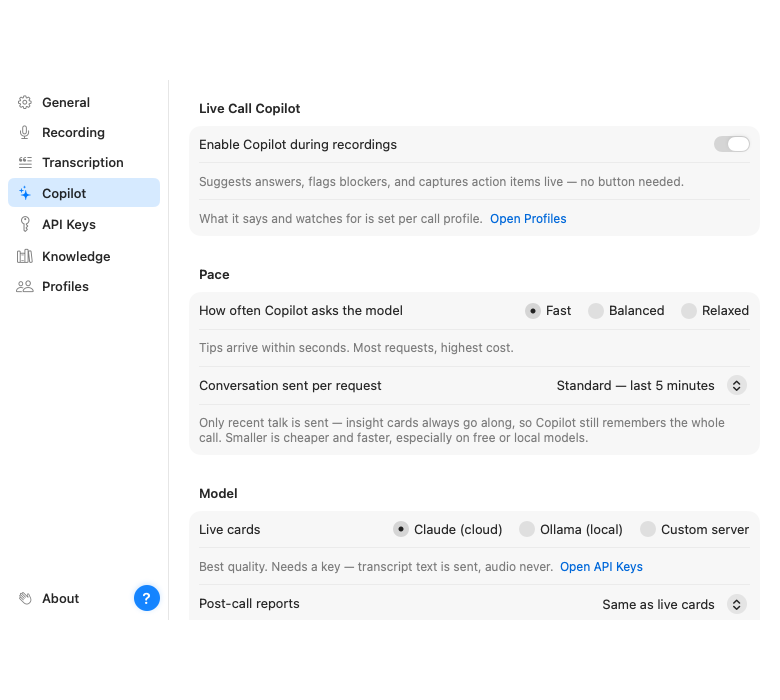
The Assistant is the AI layer: live suggestion cards during the call and the report afterwards. It is off by default and Parrot works perfectly well as a recorder and transcriber without it. When you want it, flip it on in Settings → Assistant and pick who does the thinking.
The quickest way is the guided setup: Settings → Assistant → Set up the Assistant, or the Assistant card on Home. It walks you through Private (Ollama on your Mac, installed for you), Balanced (Claude, audio stays on your Mac) or Cloud (Claude plus Deepgram), and checks your keys before saving them.
On Claude, there is one optional extra: a TypeSafe AI key (Settings → API Keys). With it, the moment the other side asks something your documents cover, Parrot shows the matching excerpt as a "From your docs" card, usually within a second, while Claude is still writing its answer. Claude's card then takes over. Without the key nothing changes. It sends the question, a couple of lines of context and the matching snippets of your documents to TypeSafe, never audio, and it only works when your documents are tagged into the call profile you are using.
Live cards need to be quick and sharp. The post-call report has all the time in the world. So Parrot lets you pick a different backend for each: a common combo is Claude for the live cards and a local model for reports, which keeps reports free and private without slowing the call down. If you only set up one, both jobs use it.