Parrot remembers every call it has finished. Ask it anything, like "What did I promise Acme?" or "What did Jeremy say about pricing in August?", and you get a short answer where every fact carries a small chip such as 12:34 · Acme renewal. Click the chip and that meeting opens at that exact line, ready to play.
Ask Parrot is new, so it's marked Beta. It's still learning and an answer can miss something, so click a time to check where it came from. A new chat has a Send feedback link: tell us what worked and what didn't.
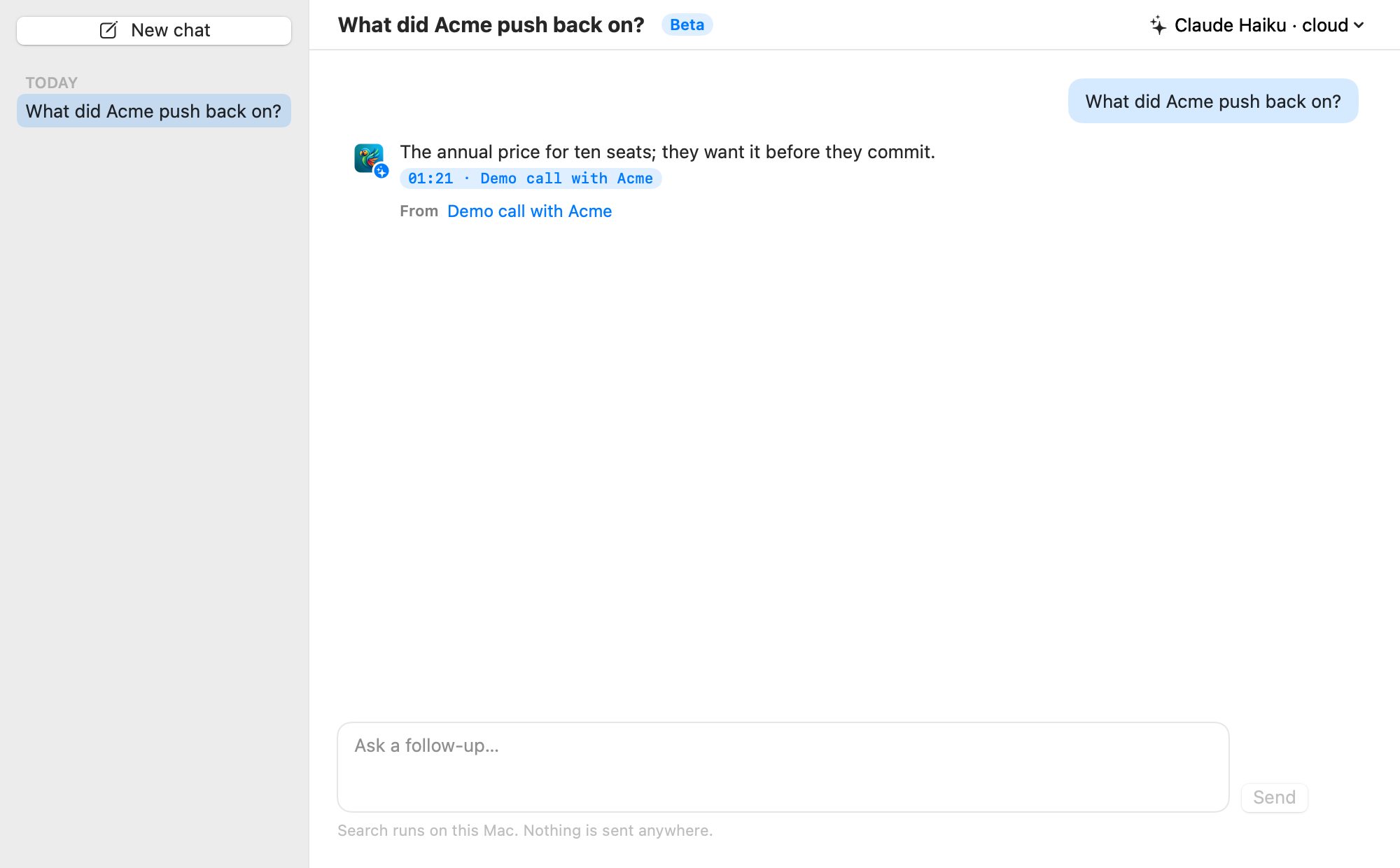
Open Ask Parrot from the sidebar, press ⌘K anywhere, or click Ask on a meeting page to ask about that one call.
Every question you ask starts or continues a saved chat, listed on the left. Click New chat to start fresh. Right-click any chat to Rename… or Delete it.
Ask a follow-up like "and what did we offer them?" and Parrot keeps the thread, so you don't have to repeat who or what you're asking about.
Click a time chip to open that meeting at that exact moment. In a chat about one meeting, chips show just the time. A chip that reads "deleted" means that meeting is gone.
Name a meeting in your question, like "What did we decide in the Northwind call?", and Parrot reads that whole meeting to answer. This works for meetings you've given a name; ones still called "Meeting Sep 23…" are easier to reach with Ask on their meeting page.
Questions about your meetings themselves are answered on your Mac, exactly, with no AI:
These answers say Counted on this Mac. Each meeting in the answer is a chip that opens it. A question about what was said, like "How many meetings were about pricing?", goes to the AI instead.
A question like "What did I promise this week?" covers many meetings at once. Words like today, yesterday, this week, last week, this month, last month, "the last 30 days" and a weekday ("on Monday" means the most recent Monday) narrow the search to that period.
Ask in either language and the answer comes back in the language you asked in. Turkish time words work too: bugün, dün, bu hafta, geçen hafta, bu ay, geçen ay, son 30 gün, weekdays like pazartesi, and forms like dünkü or geçen haftaki. Counts work in Turkish as well, like "Geçen ay kaç toplantı yaptım?", "Ahmet'le kaç toplantı yaptım?" or "En uzun toplantılarım".
Ask Parrot can use one of three AIs:
It uses your reports AI unless you pick another. The name in the top-right corner of the chat says which AI is writing the answer. Switch it there, or in Settings → Assistant → Model → Ask Parrot. Whichever you pick, the search itself runs on your Mac.
Which to pick: Claude gives the best answers, especially for questions across many meetings. A small local model through Ollama is good for questions about one meeting, and counts are exact either way, but it can mix up people or meetings when a question spans several.
If Ask's AI is Ollama and Ollama isn't open, or the model isn't downloaded yet, a message at the top of the chat says so, with Check Again or Download (size) to fix it.
A new chat shows Get written answers with two buttons: Use Claude (needs a key) and Use a free AI on this Mac. Without an AI, Parrot still works: it shows the closest moments from your meetings instead of a written answer.
Search always runs on your Mac. Only the best passages and this chat's recent messages go to a cloud AI to write the answer; with a local model through Ollama, nothing leaves at all. Meetings recorded on-device only never leave your Mac, including in earlier answers that used them.
Stop cancels an answer that's still writing. Your question goes back in the box so you can edit or resend it.
When your calendar is connected and a call starts with someone you've met before (same invitees, or the next meeting in a recurring series), the live Assistant's Briefed card shows the open items from last time: next steps and promises from that meeting's report. The Assistant keeps them in mind and flags them during the call when they come up. This is read straight from your own report, on your Mac, with no extra AI call.